Change email
Plan and Design
On this page
Change email is used to assign an email address and account name for a user. You can have different patterns for groups of users, so employees, contractors, and students can have different email addresses.
Patterns for email and account names are associated with a collection, so make sure you have configured these for the groups of people who need different patterns.
Patterns
For each collection, you define patterns in the order you want them to be selected. The order patters are evaluated is defined with a priority, where a lower number is higher priority. You define one set of patterns for the Email address and a different set for the account name. For email, you can also select if a pattern is used for userPrincipalName, email address, or both.
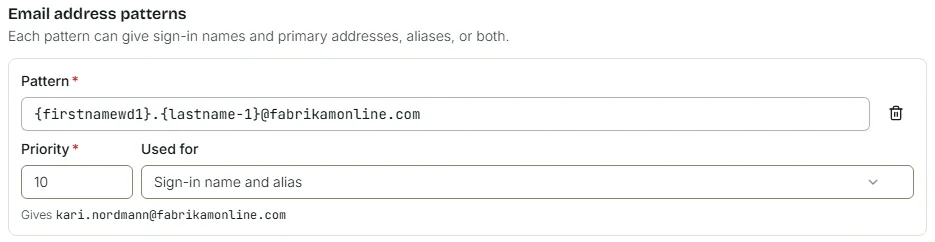
A pattern can contain placeholders. This will take information from the user to build the email address and account name.
This is how one rule can look like:
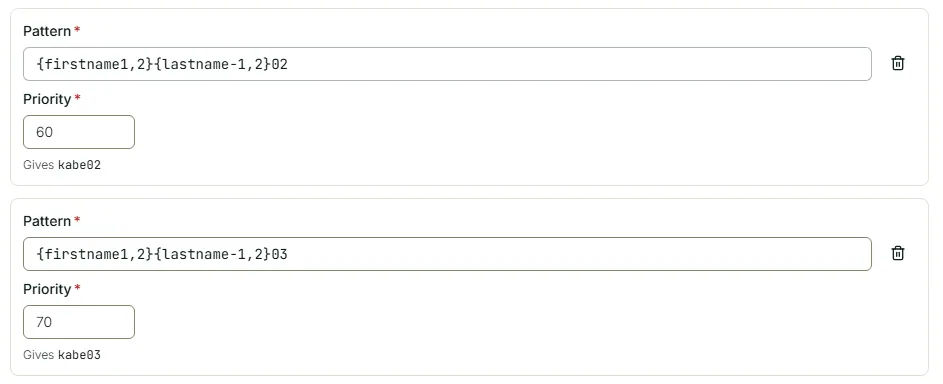
When you want the logic to include the next free number, you would define these as separate patterns with correct priority these should be tested.
If a user is a member of multiple email pattern collections, they are merged. When displayed to the user, the resulting email addresses are sorted in order of length, with any address with a number before the @ is sorted last.
Placeholders
| Placeholder | Replaced with |
|---|---|
| {firstname1} | First firstname |
| {firstname2} | Second firstname |
| {firstname3} | Third firstname |
| {firstname-1} | Last firstname |
| {firstname-2} | Second last firstname |
| {firstname-3} | Third last firstname |
| {lastname1} | First lastname |
| {lastname2} | Second lastname |
| {lastname3} | Third lastname |
| {lastname-1} | Last lastname |
| {lastname-2} | Second last lastname |
| {lastname-3} | Third last lastname |
| {firstnamewd1} | First firstname, with dashes included |
| {firstnamewd2} | Second firstname, with dashes included |
| {firstnamewd3} | Third firstname, with dashes included |
| {firstnamewd-1} | Last firstname, with dashes included |
| {firstnamewd-2} | Second last firstname, with dashes included |
| {firstnamewd-3} | Third last firstname, with dashes included |
| {lastnamewd1} | First lastname, with dashes included |
| {lastnamewd2} | Second lastname, with dashes included |
| {lastnamewd3} | Third lastname, with dashes included |
| {lastnamewd-1} | Last lastname, with dashes included |
| {lastnamewd-2} | Second last lastname |
| {lastnamewd-3} | Third last lastname |
| {onpremisessamaccountname} | The onpremisessamaccountname attribute of the user |
| {mailnickname} | The mailNickname attribute of the user |
| {currentsuffix} | The current UPN suffix of the user |
We also allow for extracting the first n characters of the placeholders, through the {<placeholder>,n} pattern:
| Placeholder | Replaced with |
|---|---|
| {firstname1,1} | First character of first firstname |
| {lastnamewd-1,3} | First three characters of the last lastname, with dashes included |
Example usage
A user that is a member of Example Group 1 and Example Group 2, with the configurations shown below, will get the following options available to them:
| Option | Alias | Sign-in name |
|---|---|---|
| {firstname1}.{lastname-1}@contoso.com | Yes | Yes |
| {firstname1}.{firstname2,1}.{lastname-1}@contoso.com | Yes | Yes |
| {firstname1}.{lastname-1}@nwtraders.com | Yes | Yes |
| {firstname1}.{firstname2,1}.{lastname-1}@nwtraders.com | Yes | Yes |
A user that is a member of only Example Group 1 will get these options:
| Option | Alias | Sign-in name |
|---|---|---|
| {firstname1}.{lastname-1}@contoso.com | Yes | Yes |
| {firstname1}.{firstname2,1}.{lastname-1}@contoso.com | Yes | Yes |
A user that is member of only Example Group 3 will get these options (will only be able to add aliases):
| Option | Alias | Sign-in name |
|---|---|---|
| {firstname1}.{lastname-1}@test.com | Yes | |
| {firstname1}.{firstname2,1}.{lastname-1}@test.com | Yes |
A user that is member of Example Group 1 and Example Group 3 will get these options:
| Option | Alias | Sign-in name |
|---|---|---|
| {firstname1}.{lastname-1}@contoso.com | Yes | Yes |
| {firstname1}.{firstname2,1}.{lastname-1}@contoso.com | Yes | Yes |
| {firstname1}.{lastname-1}@test.com | Yes | |
| {firstname1}.{firstname2,1}.{lastname-1}@test.com | Yes |
History
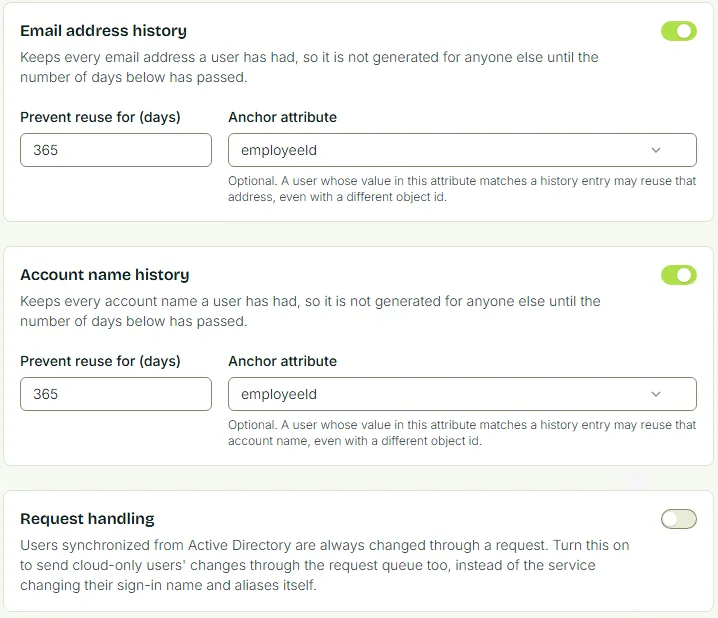
Change email can store used email addresses and account names, so they are not used for a while. This is off by default, but you likely want an address to be quarantined for a while, so an alias isn’t reused for a time you define.
It is possible to configure an anchor attribute. This attribute allows a user to get back a reserved alias when the attribute has the same value as a previous account. This is useful for scenarios where a user leaves the company and is then rehired within the Change Email quarantine period with the same employeeId.