Events
Grant access to send emails through Microsoft 365
Let Fortytwo Universe send email from chosen mailboxes in your Microsoft 365, and from no others, with role based access control for applications in Exchange Online.
On this page
- Before you start
- Grant the access
- Consent to the application
- Find the application's object ID
- Connect to Exchange Online
- Tell Exchange Online about the application
- Say which mailboxes it may send from
- Give the permission for those mailboxes
- Check it
- Add or remove a mailbox later
- Take the permission away
- If Mail.Send was granted in Microsoft Entra ID
Fortytwo Universe allows you to use your own email addresses in Microsoft 365 as sender addresses for emails. This means that your users see a sender like noreply@contoso.com, which is a known domain, and you will have no issues with spam filters blocking the email.
There are a few steps required to grant Fortytwo Universe access to send emails. They are done once per mailbox.
The permission is given in Exchange Online, for the mailboxes you choose, with Role Based Access Control for Applications. Fortytwo Universe does not ask for the Microsoft Graph permission Mail.Send in Microsoft Entra ID, because that permission lets an application send as anyone in your organization.
Do not grant the Microsoft Graph permission Mail.Send to Fortytwo Universe - Workflows in Microsoft Entra ID. Permissions given in Microsoft Entra ID and in Exchange Online add up, so with that permission the application can send from every mailbox, whatever you limit it to below. If it was granted earlier, see If Mail.Send was granted in Microsoft Entra ID.
Before you start
You need:
- a Global administrator or Privileged role administrator, to consent to the application;
- an Exchange administrator, who is a member of the Organization Management role group, for the steps in Exchange Online;
- the Exchange Online PowerShell module;
- the address of each mailbox Fortytwo Universe may send from.
Grant the access
Consent to the application
If you have not already done so, consent to the Fortytwo Universe - Workflows application:
https://login.microsoftonline.com/common/adminconsent?client_id=a215ca40-216b-49aa-ac23-f5256a8d6555The application now appears under Enterprise applications in the Microsoft Entra admin center.
Find the application's object ID
In the Microsoft Entra admin center, open Enterprise applications and select Fortytwo Universe - Workflows. Copy its Object ID. The Application ID is a215ca40-216b-49aa-ac23-f5256a8d6555.
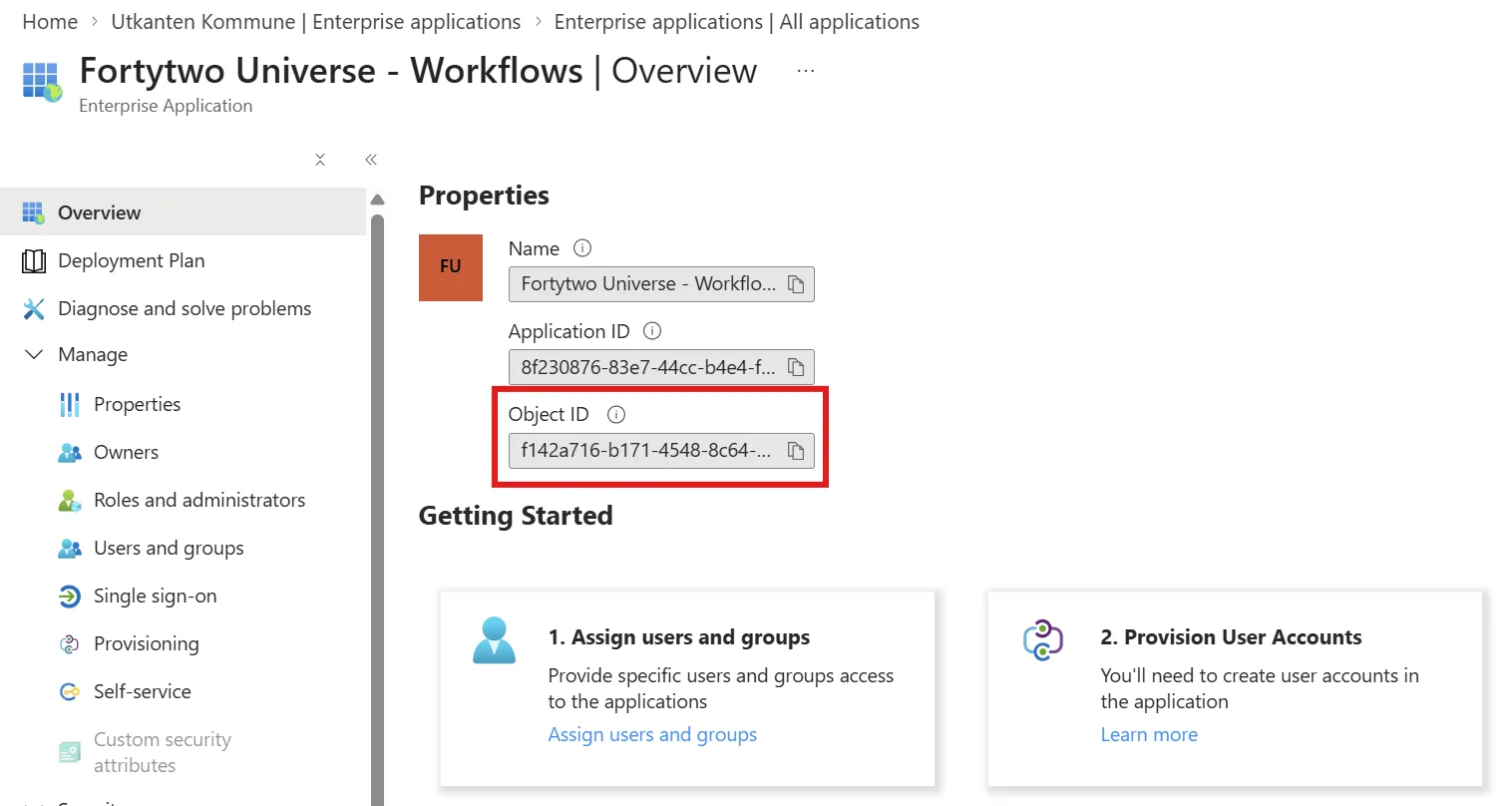
Use the object ID from Enterprise applications. The one under App registrations is a different value and does not work.
Connect to Exchange Online
Connect-ExchangeOnlineTell Exchange Online about the application
Replace the object ID with the one you copied:
New-ServicePrincipal -AppId "a215ca40-216b-49aa-ac23-f5256a8d6555" -ObjectId "OBJECT_ID_OF_FORTYTWO_UNIVERSE_WORKFLOWS_APP" -DisplayName "Fortytwo Universe - Workflows"Say which mailboxes it may send from
Create a management scope that covers only the mailboxes Fortytwo Universe is allowed to send from. Replace the address with your sender address:
New-ManagementScope -Name "Fortytwo-Universe-MailSend-Scope" -RecipientRestrictionFilter "PrimarySmtpAddress -eq 'noreply@contoso.com'"For several mailboxes, join the addresses with -or:
New-ManagementScope -Name "Fortytwo-Universe-MailSend-Scope" -RecipientRestrictionFilter "PrimarySmtpAddress -eq 'noreply@contoso.com' -or PrimarySmtpAddress -eq 'servicedesk@contoso.com'"Give the permission for those mailboxes
New-ManagementRoleAssignment -App "OBJECT_ID_OF_FORTYTWO_UNIVERSE_WORKFLOWS_APP" -Role "Application Mail.Send" -CustomResourceScope "Fortytwo-Universe-MailSend-Scope"Check it
Test a mailbox that is allowed and one that is not:
Test-ServicePrincipalAuthorization -Identity "OBJECT_ID_OF_FORTYTWO_UNIVERSE_WORKFLOWS_APP" -Resource "noreply@contoso.com" | Format-Table
Test-ServicePrincipalAuthorization -Identity "OBJECT_ID_OF_FORTYTWO_UNIVERSE_WORKFLOWS_APP" -Resource "someone.else@contoso.com" | Format-Table
InScope is True for the mailbox you allowed and False for any other.
Exchange Online keeps an application's permissions in a cache. A change can take between 30 minutes and two hours to apply to emails that are sent. The test command above does not use the cache, so it shows the result at once.
You can now use the mailbox as Send from in a workflow's Send email action. See Email.
Add or remove a mailbox later
Change the management scope. The role assignment keeps pointing at it:
Set-ManagementScope -Identity "Fortytwo-Universe-MailSend-Scope" -RecipientRestrictionFilter "PrimarySmtpAddress -eq 'noreply@contoso.com' -or PrimarySmtpAddress -eq 'hr@contoso.com'"Take the permission away
Remove the role assignment. Fortytwo Universe can then send from no mailbox:
Get-ManagementRoleAssignment -Role "Application Mail.Send" | Where-Object { $_.CustomResourceScope -eq "Fortytwo-Universe-MailSend-Scope" } | Remove-ManagementRoleAssignmentIf Mail.Send was granted in Microsoft Entra ID
An earlier version of this page asked you to grant the Microsoft Graph permission Mail.Send to the application in Microsoft Entra ID before limiting it in Exchange Online. Microsoft documents that the two add up: a permission granted in Microsoft Entra ID applies to every mailbox, and a scope in Exchange Online does not narrow it.
If you followed those steps, remove the permission in Microsoft Entra ID once the role assignment above is in place:
- In the Microsoft Entra admin center, open Enterprise applications > Fortytwo Universe - Workflows > Permissions.
- If Mail.Send is listed under Microsoft Graph, select Review permissions and follow the instructions to revoke it, or remove it with Microsoft Graph PowerShell:
Connect-MgGraph -Scopes "AppRoleAssignment.ReadWrite.All", "Application.Read.All"

$application = Get-MgServicePrincipal -Filter "appId eq 'a215ca40-216b-49aa-ac23-f5256a8d6555'"
$graph = Get-MgServicePrincipal -Filter "appId eq '00000003-0000-0000-c000-000000000000'"
$mailSend = $graph.AppRoles | Where-Object { $_.Value -eq "Mail.Send" }

Get-MgServicePrincipalAppRoleAssignment -ServicePrincipalId $application.Id |
    Where-Object { $_.AppRoleId -eq $mailSend.Id } |
    ForEach-Object { Remove-MgServicePrincipalAppRoleAssignment -ServicePrincipalId $application.Id -AppRoleAssignmentId $_.Id }
Then run the check under Grant the access again. Sending keeps working for the mailboxes in the scope.